Inspect, interact with and test real Qt Widgets and QML applications from Python, C++ or .NET. veriCue works on the binary you already ship - on supported configurations with no source change and no rebuild - and drives the application's real objects, not screen coordinates.
No credit card, no sales contact, no license key to request - the self-service 30-day trial starts the first time the veriCue Runtime runs inside your app. Licensed by concurrent automation session, not per developer, and verified offline: the Runtime never phones home.
Every one of these is a reason teams end up testing a Qt UI by hand, or not at all.
Coordinate and image-based tools do not know what a QPushButton is. They cannot read a property, cannot wait on a signal, and break the first time a layout moves.
Unit tests stay green while a QML binding, a renamed object or a model update quietly breaks the assembled UI - and it is found in manual QA, or by a customer.
Object lookup, event delivery, waits, screenshot baselines, a CI harness - weeks of work before the first stable test, and then somebody owns it forever.
One command downloads a self-contained demo app (no Qt install needed), drives it live from Python, and leaves a screenshot on your disk. Linux x86_64 - other platforms start at installation.
curl -sL https://dl.vericue.dev/try.sh | bash
Already have a Qt app? On supported configurations, vericue run ./your-qt-app
starts your own unmodified binary with the Runtime inside - no source changes, no rebuild -
and vericue inspect ./your-qt-app opens the Inspector on it.
veriCue uses the Qt your application already has; it does not bring a second one into your process.
Supported configurations →
· How vericue run works →
· Platform limitations →
Full 3-step trial guide →
Four things veriCue does with the Qt application you already ship.
Start the binary you already build, with the Runtime inside it and no source change:
vericue run ./MyApplication
Linux x64 and Windows x64, dynamically linked Qt 5.15 or Qt 6. On an unsupported configuration it says so before starting anything rather than half-working - the envelope is in the guide.
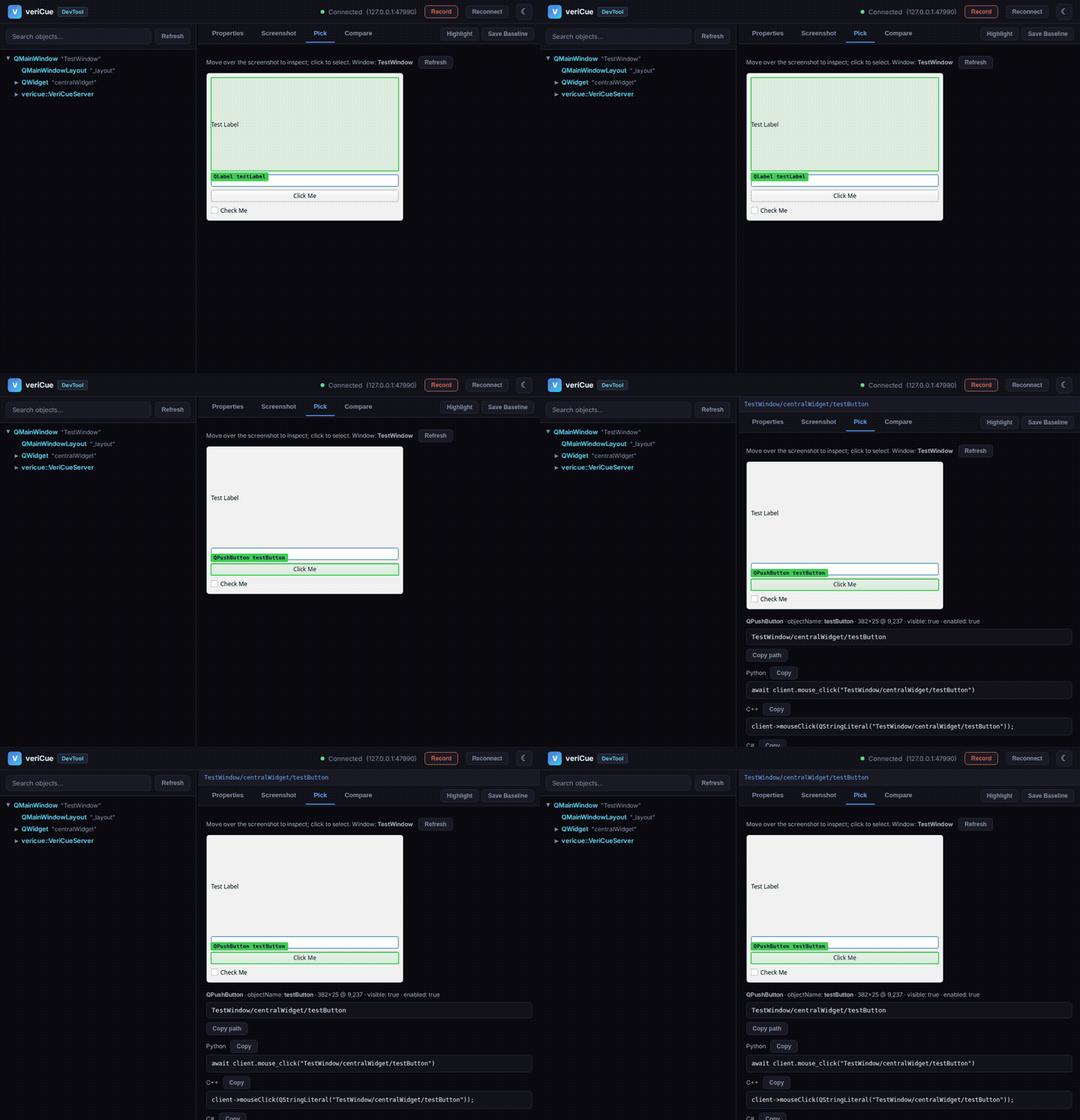
Point at a control and get its canonical path, its properties and the code to drive it:
vericue inspect ./MyApplication
Point at the running application: the element under the cursor is outlined in the application itself, and the click that chooses it is swallowed rather than delivered.
Drive the real objects from Python, C++ or .NET - properties, signals and model data,
not screen coordinates. Waits are on actual signals and properties rather than
sleep().
Your existing runners: pytest, GoogleTest, xUnit, Robot Framework.
Expose the running application to an MCP-capable agent:
vericue mcp --port 4242
The agent reads the object tree that actually exists and interacts with it, instead of guessing locators from a screenshot.
The part that turns "somewhere in this QML tree" into a line you can paste into a test.
vericue inspect ./MyApplication starts your application and opens the
Inspector beside it.
Press Pick element and move the pointer over your running application. The element under the cursor is outlined in the application itself, the way browser DevTools outlines a DOM node - and the click that chooses it is swallowed, so pointing at a Delete button selects it instead of pressing it. Picking on a captured screenshot is available too, for when you would rather not touch the live window at all.
Select an element and you get its canonical path, the properties you can read, the actions it supports, and a snippet in Python, C++ or C#.
It ships as a self-contained download with its own Qt, so it runs on a machine that has no Qt installed - see open-source components for what that carries and why.
An MCP server over the same Runtime and the same protocol - not a second way in.
An agent that speaks the Model Context Protocol can ask the running application what it contains, interact with it, and write a test against objects that actually exist rather than locators guessed from an image.
The workflow is the useful part: inspect the live object tree, act on it, read back the result, then keep what worked as a test.
It is the same Runtime, the same licensing and the same object paths as the Python, C++ and .NET clients. Nothing about your application changes to enable it.
# expose a running application to an agent $ vericue mcp --port 4242 # the agent then works in veriCue's own terms: # object_tree, find_objects - what is on screen # get_properties, screenshot - read it back # click, type_text, key_press - act, as real Qt events # wait_for_property - wait, instead of sleeping
Four things that decide whether a GUI test suite still runs a year after someone wrote it.
The Runtime runs inside your process and walks the live QObject / QQuickItem tree. Ask for MainWindow/okBtn and you get the actual widget - properties, signals, model data - not a screen-coordinate guess.
One product, one protocol surface, for Qt 5.15 and Qt 6 applications using Widgets, QML, or both.
Python, C++, and .NET clients with async-native APIs. Your existing test runners - pytest, GoogleTest, xUnit, Robot Framework - and your existing CI workflow.
Runs in CI, waits on real signals and properties instead of sleep(), and backs it up with screenshots, visual regression and JUnit/HTML reports.
Open, documented wire protocol - length-prefixed JSON over local IPC or TCP, write a client in any language: protocol docs.
Same protocol surface across SDKs. Pick the language that matches your CI and your developers' muscle memory.
MultiVeriCueClientPython quick start · C++ quick start · C# quick start · runnable examples
import os from vericue import VeriCueClient async with VeriCueClient() as c: # Same host: the local endpoint the app announced await c.connect_local(os.environ["VERICUE_ENDPOINT"]) # Across hosts or containers, and on Windows: # await c.connect("10.0.0.5", 4242) # Inspect btn = await c.find_object(path="MainWindow/okBtn") assert btn["className"] == "QPushButton" # Drive await c.mouse_click("MainWindow/okBtn") # Subscribe to a signal - push events sub = await c.subscribe_signal( "MainWindow/uploader", "finished", ) event = await c.next_event(timeout=10)
#include <vericue/gtest_fixture.h> class LoginTest : public vericue::VeriCueTest {}; TEST_F(LoginTest, OkButtonClicks) { auto r = invoke("mouse_click", QJsonObject{ {"path", "MainWindow/okBtn"}, }); EXPECT_TRUE(r["clicked"].toBool()); auto p = invoke("get_properties", QJsonObject{ {"path", "MainWindow/statusLabel"}, {"properties", QJsonArray{"text"}}, }); EXPECT_EQ( p["properties"].toObject()["text"].toString(), "Logged in" ); }
using VeriCue; await using var client = new VeriCueClient(); // Same host (Linux, macOS): local IPC endpoint await client.ConnectLocalAsync(endpoint); // Across hosts, and on Windows: // await client.ConnectAsync("10.0.0.5", 4242); await client.TypeTextAsync("LoginWindow/user", "alice"); await client.MouseClickAsync("LoginWindow/loginBtn"); var props = await client.GetPropertiesAsync( "MainWindow/statusLabel", new[] { "text" } ); Assert.Equal("Logged in", props .GetProperty("properties") .GetProperty("text").GetString());
Your Qt application hosts the veriCue Runtime in-process. Your test code talks to it over a local endpoint on the same machine, or over TCP when it has to cross a host, container or device boundary. That's it.
setLicenseFile()startLocal() or start(0)Local IPC for same-host runs (Linux, macOS), TCP across hosts, containers and devices - and the supported transport on Windows. Same protocol and authentication on both: Transports: local IPC vs TCP.
Each of these is the right tool for something. The short version, for automating an assembled Qt application at the object level:
veriCue does not replace an enterprise suite in every scenario, and QTest stays the right tool for units - the full, honest breakdown including when veriCue is not the best choice is on the comparison page.
Qt 5.15 & Qt 6 · Widgets and QML · Linux, Windows and macOS (per-platform details differ) · Python, C++ and .NET clients. The specifics live on maintained pages, not in homepage prose:
Widgets, QML and multi-SDK flows you can clone and run - the same apps our CI drives.
What is supported where, per platform and Qt major, including how the Runtime gets into your app.
The edges, stated up front - before you discover them mid-proof-of-concept.
All 42 protocol commands: discovery, interaction, model data, subscriptions, performance.
Headless runs in documented environments, JUnit XML and HTML reports, pipeline recipes.
The 30-day trial is self-service and keyless: download, run, write your first test.
Start your 30-day trialYou do not need us to start - the 30-day trial is keyless and self-service (start here). Write to us when you want: